Lesson Results and Certification Criteria
This guide explains how to view and understand lesson-level typing results in USTAAD Typing Academy. Results are essential for tracking progress, earning certificates, and identifying areas for improvement.
Minimum Practice Time for Results
Typing results are only tracked and displayed after a minimum of 30 seconds of practice. This ensures meaningful data collection and prevents incomplete or inaccurate measurements.
- No results before 30 seconds: If you stop practicing before 30 seconds, no results will be recorded or shown.
- Certificate requirement: Typing results are mandatory for certificate eligibility, so consistent 30+ second sessions are essential.
Certificate Criteria and Star System
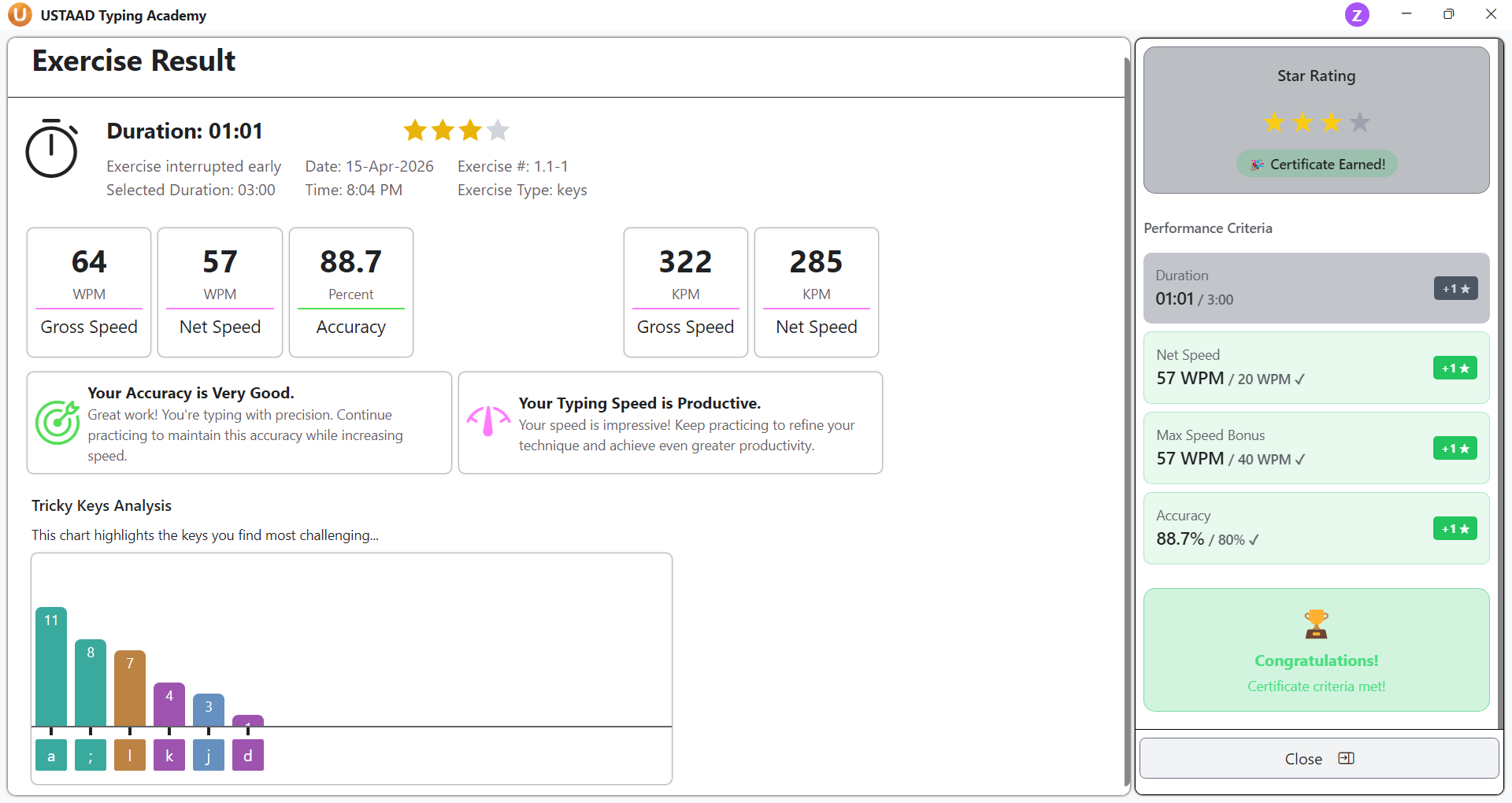
Each chapter's exercises have specific typing criteria that must be met for certificate qualification. When results are displayed, a sidebar shows whether the certificate criteria have been passed.
Star Requirements
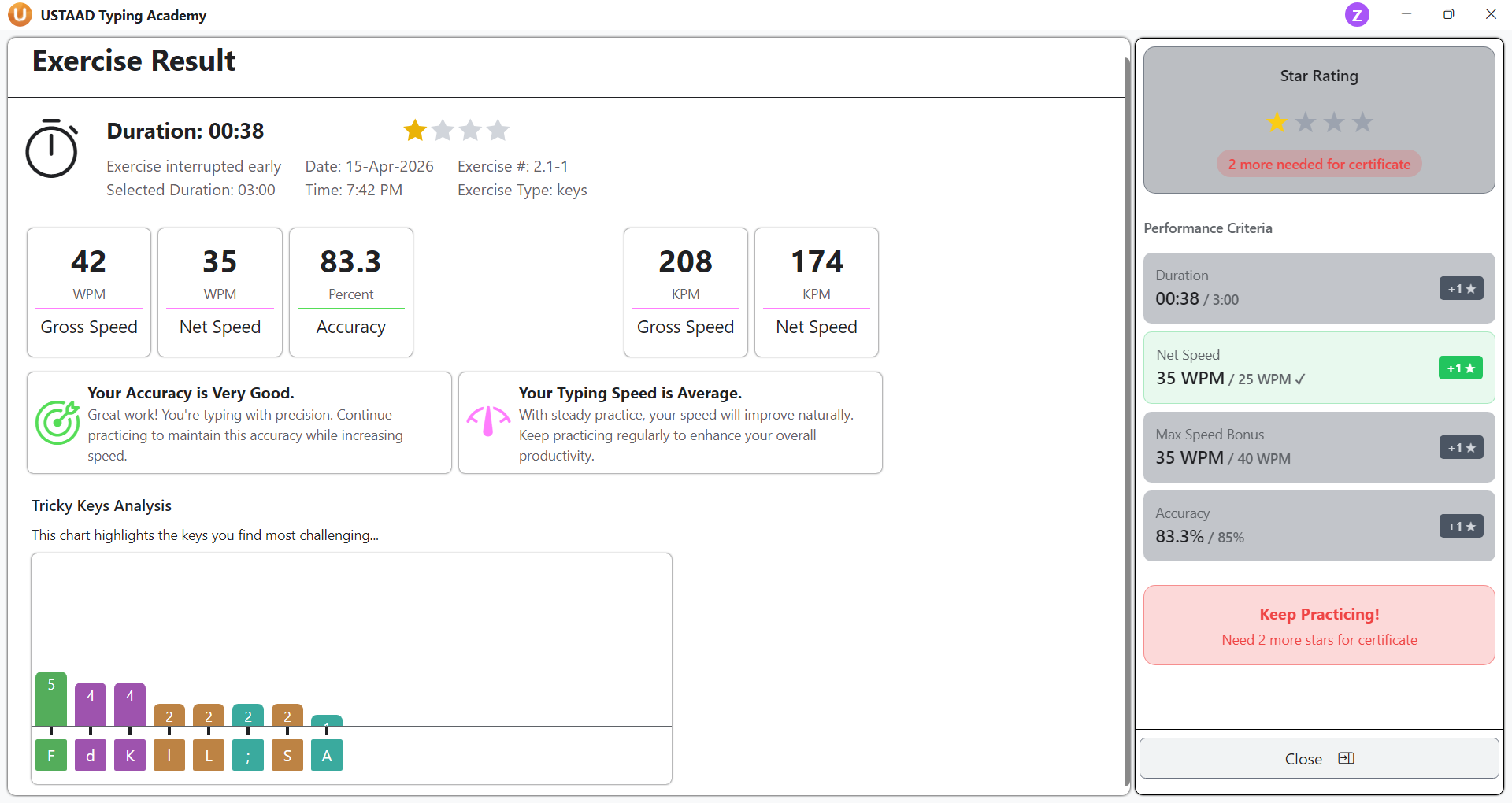
To pass certificate criteria, each drill result must earn at least 3 stars out of 4 possible stars:
- Good Speed Star: Earned for achieving a solid typing speed
- Fast Speed Star: Earned for reaching high typing speed thresholds
- Accuracy Star: Earned for maintaining high accuracy percentage
- Duration Star: Earned for completing a full 3-minute practice session
Star Display
The results page shows which speeds and criteria earned stars, helping you understand your performance breakdown.
Typing Results Page Metrics
The main typing results page displays three key metrics:
Gross Speed
- Measures total typing speed including all keystrokes
- Displayed in two units:
- WPM (Words Per Minute)
- KPM (Keystrokes Per Minute)
Net Speed
- Measures effective typing speed after accounting for errors
- Also displayed in WPM and KPM
- More accurate reflection of productive typing
Accuracy
- Percentage of correctly typed characters
- Critical for certificate eligibility
- Higher accuracy leads to better net speed scores
Performance Tips and Analysis
The results page provides personalized tips based on your performance:
- Accuracy tips: Guidance on improving typing precision
- Speed tips: Advice for increasing typing velocity
- Overall feedback: Suggestions for balanced improvement
Tricky Keys Chart
A dedicated chart shows which keys you typed incorrectly and their frequency:
- Key identification: Lists problematic keys (e.g., A, S, common mistakes)
- Frequency count: Shows how often each key was typed wrong
- Impact analysis: Helps you understand which errors most affect your typing performance
- Targeted practice: Use this data to focus on weak keys in future sessions
Lesson Results Table Structure
Results are displayed in organized tables with the following columns:
Speed Column
- Shows your typing speed in WPM/KPM
- Both gross and net speeds may be displayed
Accuracy Column
- Percentage of correct typing
- Higher percentages indicate better performance
Time Column
- Duration of the practice session
- Minimum 30 seconds required for results
Date Column
- When the practice session occurred
- Helps track progress over time
Identifying Weak Areas
Use the results data to pinpoint improvement opportunities:
- Low accuracy keys: Focus on tricky keys chart
- Inconsistent speeds: Practice for longer durations
- Chapter-specific issues: Review exercises with poor results
- Time-based trends: Compare performance across dates
Certificate Progress Tracking
Results directly impact certificate eligibility:
- Star accumulation: Track stars earned across all drills
- Criteria completion: Monitor which exercises meet certificate requirements
- Overall progress: View certificate readiness status
- Achievement milestones: Celebrate when criteria are met
Best Practices for Results Analysis
- Practice consistently for at least 30 seconds per session
- Review results after each practice to identify patterns
- Use tricky keys data for focused improvement
- Aim for 3+ stars on all drills to maintain certificate eligibility
- Track progress over time to see improvement trends
Why Results Matter
Typing results provide the data foundation for:
- Certificate earning and validation
- Personal progress tracking
- Targeted skill improvement
- Performance benchmarking
- Motivation through measurable achievements